Trainerize Review 2026 — The Full Picture for Fitness Coaches
Trainerize (now ABC Trainerize) is the most popular workout programming platform for personal trainers, with 400,000+ coaches and 45,000+ fitness businesses on the platform. The workout builder is excellent. But if nutrition is a core part of your coaching, you'll hit limits fast. Here's the full breakdown.

What Is Trainerize?
Trainerize is an all-in-one coaching platform built around workout programming and client management. It was founded in 2012 in Vancouver, Canada, and acquired by ABC Financial (now ABC Fitness) in September 2020. Today it serves over 400,000 personal trainers and coaches worldwide.
The core product lets you build, schedule, and deliver workout programs to clients through a branded mobile app. You get a drag-and-drop workout builder, an exercise video library, support for supersets, circuits, AMRAP, and auto-progression based on %1RM. It's purpose-built for the training side of coaching.
Beyond workouts, Trainerize bundles habit coaching, in-app messaging, community forums, progress photos, scheduling, integrated payments (via Stripe), and a nutrition module. Nutrition tracking is included on all paid plans. But the full meal planning capability, the Smart Meal Planner, requires a paid add-on. More on that shortly.
Trainerize Homepage
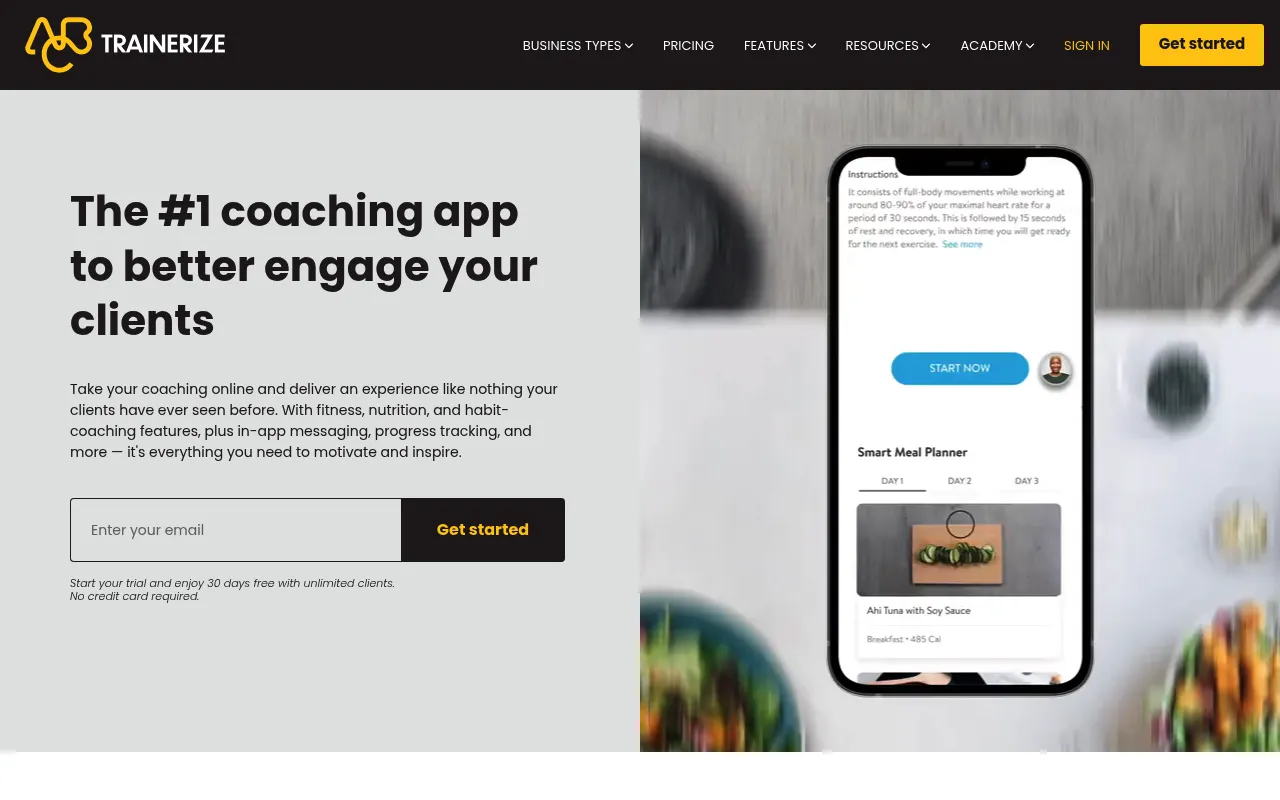
Screenshot captured April 2026.
Key Features
Trainerize covers a wide range of coaching needs. Here's what stands out after reviewing the platform in detail.
Workout builder and exercise library
This is where Trainerize shines. Build workouts by dragging exercises into place, configuring sets, reps, tempo, and rest periods. The builder supports supersets, circuits, intervals, AMRAP, EMOM, and %1RM auto-progression that calculates weights based on each client's tested maxes. You can create extended programs (4, 8, or 12 weeks) and schedule automated delivery. The exercise library includes demonstration videos for every movement, and you can upload your own custom exercise videos.
Habit coaching
Assign daily habits beyond workouts: water intake, sleep, steps, meditation, or custom habits you define. Clients check them off in the app. You see completion rates on your dashboard, with achievement badges and streak tracking to keep clients motivated. It's a simple feature, but it helps coaches who want visibility into lifestyle behaviors alongside training.
Client communication and community
Built-in 1-on-1 messaging and group community forums. Broadcast messaging lets you update all clients at once. The community feature works like a private social feed where clients post updates and interact. Video coaching is available as a $10/month add-on for live sessions. For trainers running group programs or wanting to replace Facebook Groups, the community feature covers the basics.
Progress tracking
Each client gets a profile with body metrics, progress photos (front/side/back comparison), workout history, and personal records. You can schedule measurement check-ins and create onboarding questionnaires. The dashboard gives you a bird's-eye view of client engagement, so you can spot who's falling off before they ghost.
Nutrition tracking (basic)
All paid plans include basic nutrition tracking. Clients can scan barcodes or search a USDA-verified food database to log meals. You can set calorie and macro targets, and clients see compliance scores with visual breakdowns. MyFitnessPal integration lets clients sync food logs. Photo food journaling is also available. This covers the "tracking" side of nutrition well enough.
Smart Meal Planner (add-on)
The real meal planning feature requires the Advanced Nutrition add-on ($20-$45/month depending on your plan tier). It includes 1,000+ recipes, generates up to 7 days of meals based on macro targets and dietary preferences, creates grocery lists, and lets clients swap meals. You can also upload PDF meal plans or connect with Evolution Nutrition. It's functional, but it doesn't generate custom macro-targeted plans from scratch the way dedicated nutrition tools do.
Payments and business tools
Sell coaching packages, subscriptions, and one-time products through the app via Stripe. The Business add-on ($25/month) adds payment access, automation, referral tools, and premium content delivery. A revenue dashboard tracks monthly performance. It's not as polished as a dedicated billing platform, but it keeps payments inside the coaching experience.
Custom branded app
Pro plans offer a custom branded app for a $169 one-time fee (plus Apple's annual developer fee). Your logo, your colors, your name on the App Store. Studio Plus includes this at no extra cost. For solo trainers, this is a meaningful branding upgrade. But unlike some competitors, the branding applies to the coaching app, not to the meal plan outputs themselves.
Trainerize Pricing (2026)
Trainerize pricing looks straightforward, but the add-on model means your real cost can be significantly higher than the base plan price. The free tier is extremely limited (1 client), and essential features like nutrition, payments, and branding are paid extras on most plans.

Screenshot captured April 2026.
| Basic | Grow | Pro 5 | Studio Plus | |
|---|---|---|---|---|
| Base price | Free | $9/mo | From $23/mo | $248/mo per location |
| Clients included | 1 | 2 | 5 (scales to 200) | 500-1,000 |
| Workout builder | ✓ | ✓ | ✓ | ✓ |
| Basic nutrition tracking | ✓ | ✓ | ✓ | ✓ |
| AI Workout Builder | ✗ | ✓ | ✓ | ✓ |
| Smart Meal Planner | ✗ | +$20/mo | +$20-45/mo | Included |
| Stripe payments | ✗ | +$10/mo | +$10/mo | Included |
| Business tools | ✗ | +$25/mo | +$25/mo | Included |
| Custom branded app | ✗ | ✗ | $169 one-time | Included |
| Free trial | 30-day free trial on all plans, no credit card required | |||
Here's the real math. Say you're a solo trainer with 50 clients who wants workouts, meal planning, and payments. That's Pro ($120/mo for 50 clients) + Advanced Nutrition ($45/mo) + Stripe Payments ($10/mo) = $175/month. Add the Business tools and you're at $200/month. The Studio Plus plan at $248/month includes everything, but it's priced for gyms and studios, not solo coaches.
Nutrition: Where Trainerize Hits Its Limits
Trainerize's nutrition capabilities break into two tiers: basic tracking (included) and the Smart Meal Planner (paid add-on). Both have clear boundaries that matter if nutrition is central to your coaching.
The included tracking lets clients log food manually, scan barcodes, or sync with MyFitnessPal. You set calorie and macro targets, and clients see compliance scores. This is solid for coaches who just want visibility into what clients eat.
The Smart Meal Planner ($20-$45/month add-on) generates meal plans from 1,000+ recipes based on macro targets and dietary preferences. Clients can swap meals, view recipes with instructions, and generate grocery lists. You can also upload PDF meal plans or add custom meals to a branded library.
What's missing: there's a minimum calorie floor of 1,400, limited macro split options, and no way to filter for specific allergies and intolerances beyond broad categories like "vegetarian" or "high protein." You can't create a fully white-labeled meal plan PDF that looks like it came from your own practice. The meal plans live inside the Trainerize app, not as a branded deliverable you can send or print.
For coaches who program workouts and want basic food logging visibility, the included tracking works. For coaches who sell meal plans as a standalone service or need clinical-grade allergy filtering, you'll need a dedicated nutrition tool alongside Trainerize.
Need meal planning alongside workouts? Promealplan gives you 1,000+ dietitian-validated recipes, macro targeting, 200+ allergy filters, and white-label branded outputs. Start free with 3 meal plans, no credit card required.
Try Promealplan free →Pros and Cons
What works well
- + Best-in-class workout builder with %1RM auto-progression, supersets, and circuits
- + 400,000+ coaches use it, large community and support ecosystem
- + Habit coaching with streaks and achievement badges
- + Wearable integrations (Apple Health, Garmin, Fitbit, Withings)
- + 30-day free trial on all plans, no credit card
- + Custom branded app option on Pro plans
- + Zapier integration for connecting to other tools
Where it falls short
- - Meal planning requires a $20-$45/month add-on
- - No white-label meal plan outputs (PDFs, branded deliverables)
- - Limited allergy filtering beyond broad dietary categories
- - 1,400 calorie minimum floor on the Smart Meal Planner
- - Add-ons stack fast: nutrition + payments + business = $55-$80/mo extra
- - Free plan limited to just 1 client
- - Some users report bugs after the ABC Fitness acquisition
Who Is Trainerize Best For?
Trainerize is built for fitness professionals who live and breathe workout programming. The feature set makes that clear. Here's who benefits most, and who should look elsewhere.
Great fit: Personal trainers focused on workout delivery
If your primary deliverable is workout programs, Trainerize is purpose-built for you. The drag-and-drop builder, %1RM auto-progression, and exercise video library make it one of the strongest workout programming tools available. Add habit coaching and progress photos, and you have a complete training management system.
Good fit: Gyms and studios with multiple trainers
The Studio Plus plan supports 500-1,000 clients with all add-ons included: branded apps, nutrition, payments, video coaching, and multi-location controls. If you run a gym with a team of trainers and want everyone on one platform, Trainerize's enterprise features and ABC Fitness integration make sense. The per-location pricing model works for multi-site businesses.
Less ideal: Coaches who sell meal plans as a service
If meal planning is a core deliverable in your coaching packages, or if you sell meal plans separately, Trainerize won't cut it alone. The Smart Meal Planner generates plans within the app but doesn't produce white-labeled PDFs or exports. Allergy filtering is limited. There's no way to create a branded meal plan document that looks like it came from your own practice. You'll need a dedicated tool for this.
Not ideal: Budget-conscious solo coaches just starting out
The free plan caps at 1 client, which is essentially a demo. Once you need nutrition, payments, and a branded app, costs escalate quickly. A solo coach with 50 clients wanting the full feature set can easily spend $175-$200/month. If you're price-sensitive and need a lean stack, the add-on model can feel like it nickel-and-dimes you.
Trainerize vs Promealplan
These are not competing platforms. They're built for different sides of the coaching equation. Trainerize is a workout-first platform. Promealplan is a nutrition-first platform. Many coaches use both. Here's how they compare side by side.
| Feature | Trainerize | Promealplan |
|---|---|---|
| Primary focus | Workout programming + client management | Macro-focused meal planning + nutrition coaching |
| Workout builder | ✓ Advanced (supersets, %1RM, exercise videos) | ✗ Not a workout tool |
| Meal plan creation | $20-$45/mo add-on, 1,000+ recipes, in-app only | ✓ 1,000+ dietitian-validated recipes, all plans |
| White-label meal plans | ✗ Not available | ✓ Branded PDF exports on all plans |
| Allergy and restriction filters | Broad categories (vegetarian, high protein) | 200+ allergies and intolerances |
| Macro targeting | Set targets, clients track compliance | Plans generated to hit exact macro targets |
| Client portal | ✓ Full coaching app with workouts + nutrition | ✓ Branded nutrition portal |
| Languages | English | English, French, Spanish |
| Free option | ✓ 1 client (Basic plan) | ✓ 3 meal plans, no credit card |
| Use together | ✓ Many coaches pair Trainerize (workouts) with Promealplan (nutrition) for full coverage | |
The takeaway: Trainerize wins on workout programming, habit coaching, and client engagement features. Promealplan wins on meal plan creation, white-label branding, allergy management, and multilingual support. They complement each other well. For a broader comparison of coaching tools, see our best software for personal trainers guide.
The Trainerize + Promealplan Stack
Instead of forcing one platform to do everything, many coaches use Trainerize and Promealplan together. Each tool handles what it does best. Here's how the stack works in practice.
Trainerize handles the training side
Build and deliver workout programs, track exercise performance, manage habits, communicate with clients, and handle payments. Your clients open Trainerize for their daily workouts, log their sets, and check in with progress photos. This is Trainerize's strength.
Promealplan handles the nutrition side
Create macro-targeted meal plans with 1,000+ dietitian-validated recipes, filter for 200+ allergies and intolerances, and export white-labeled PDFs with your branding. Clients access their meal plans through a branded portal or receive them as professional documents. This is Promealplan's strength.
Why this works better than one tool
You avoid paying for Trainerize's nutrition add-on ($20-$45/month) that doesn't produce white-label outputs anyway. You get genuinely strong meal planning instead of a checkbox feature. And you can skip the nutrition add-on entirely on your Trainerize plan, which lowers your Trainerize cost. The result: better nutrition tools for your clients at a comparable or lower total spend.
For a deeper look at how Promealplan works alongside workout platforms, see our guide on how to create meal plans for clients.
Frequently Asked Questions
How much does Trainerize cost per month?
Trainerize offers a free Basic plan for 1 client. The Grow plan starts at $9/month for 2 clients. Pro plans range from $23/month (5 clients) up to higher tiers for 200 clients. The Studio Plus plan costs $248/month per location and includes all add-ons. Add-ons like Advanced Nutrition ($20-$45/month), Stripe Payments ($10/month), and a custom branded app ($169 one-time) increase the total cost.
Does Trainerize include meal planning?
Basic meal tracking is included on all paid plans. However, the Smart Meal Planner with 1,000+ recipes, grocery list generation, and meal swapping requires the Advanced Nutrition add-on, which costs $20-$45/month depending on your plan. The meal planning feature focuses on macro tracking and food logging rather than creating fully custom, white-label meal plans for clients.
Can I use Trainerize and Promealplan together?
Yes, and many coaches do exactly this. Trainerize handles workout programming, exercise video libraries, and client communication. Promealplan handles meal plan creation with macro targeting, allergy filters, and white-label branded outputs. There's no conflict between the two. You get the strongest tool for each discipline instead of compromising on either.
Is Trainerize owned by ABC Fitness?
Yes. ABC Financial (now ABC Fitness) acquired Trainerize in September 2020. Trainerize continues to operate as a standalone product under the ABC Trainerize brand, while also being available as an add-on module for ABC's gym management platform. The acquisition brought more resources for development, but the product's core focus on workout programming remains.
What integrations does Trainerize support?
Trainerize integrates with Apple Health, MyFitnessPal, Fitbit, Garmin, Withings, Mindbody, Stripe (for payments), and Zapier (for automation). The MyFitnessPal integration lets clients log food and sync nutrition data. Zapier opens the door to connecting with hundreds of other apps. The Mindbody integration is useful for gyms already using that platform for scheduling.
Need Nutrition Tools Alongside Trainerize?
Promealplan handles meal planning so Trainerize can handle workouts. 1,000+ dietitian-validated recipes, white-label branding, and 200+ allergy filters. Start free with 3 meal plans.
Try Promealplan FreeRelated Articles
Trainerize Alternative for Meal Planning
Why coaches pair a dedicated meal planning tool with Trainerize for better nutrition results.
Best Software for Personal Trainers (2026)
Compare workout, nutrition, and client management tools for fitness coaches.
Nutrition Software for Coaches: Complete Guide
Everything you need to know about choosing nutrition software for your coaching practice.
How to Create Meal Plans for Clients
Step-by-step guide to building personalized meal plans your clients will actually follow.